Why is a website blocked on some devices but not others?
Five common causes
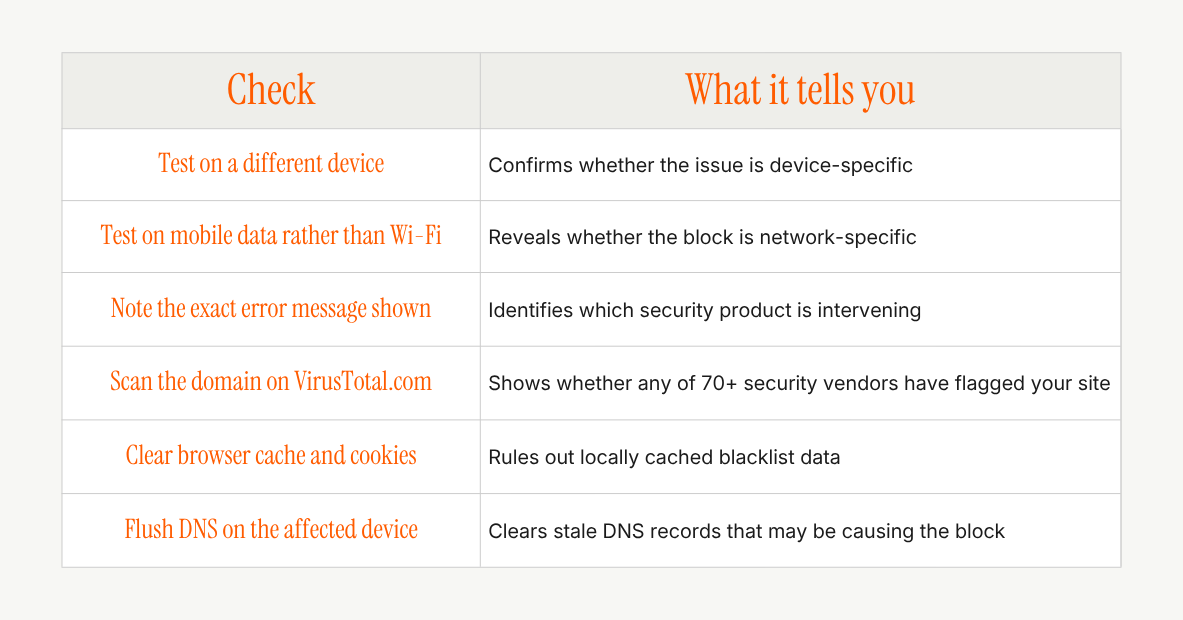
Several independent security layers can block access to a website, each operating according to its own rules. Understanding which layer is involved is the first step to fixing the problem.
1. Antivirus and endpoint security software
Products such as Kaspersky, Norton, and Bitdefender maintain databases of URLs they consider unsafe. If your domain was ever associated with spam, malware, or a shared hosting environment that was previously compromised, it may still appear on that list, even if you resolved the issue long ago. This is what is known as a false positive: your site is safe, but the security vendor's database has not been updated.
2. Firewall and network restrictions
Corporate, school, and government networks frequently apply content filtering rules. These rules may block entire categories of websites, specific domains, or certain types of content. A site that opens without issue on a home broadband connection may be completely inaccessible from an office network. This is particularly relevant if your target customers include enterprise buyers, procurement teams, or organisations in regulated industries.
3. Browser security settings
Browsers run safe-browsing checks before loading a page: Chrome and Safari both rely on Google’s Safe Browsing database, while Edge uses Microsoft Defender SmartScreen. If your domain triggers a warning in Google's Safe Browsing database, users will see a full-screen red warning before the page loads. These flags are not always up to date, and a domain can remain flagged for weeks after the underlying issue has been resolved.
4. DNS filtering
Some internet providers and network administrators use DNS-level filtering to block specific domains. A user on an affected connection cannot resolve your domain at all, regardless of whether your site is working perfectly. They will often see a generic connection error, though some filtering services display a branded block page identifying the filter instead.
5. Cached blacklist data
Outdated DNS records cached on a device can cause persistent blocking even after you have resolved the underlying issue. Flushing DNS on the device restores access in these cases. Note that browser safe-browsing warnings are not cleared; this way those lists update on the browser’s own schedule. This is the least common cause on the list, but the quickest to rule out.